In-Home display: how it works
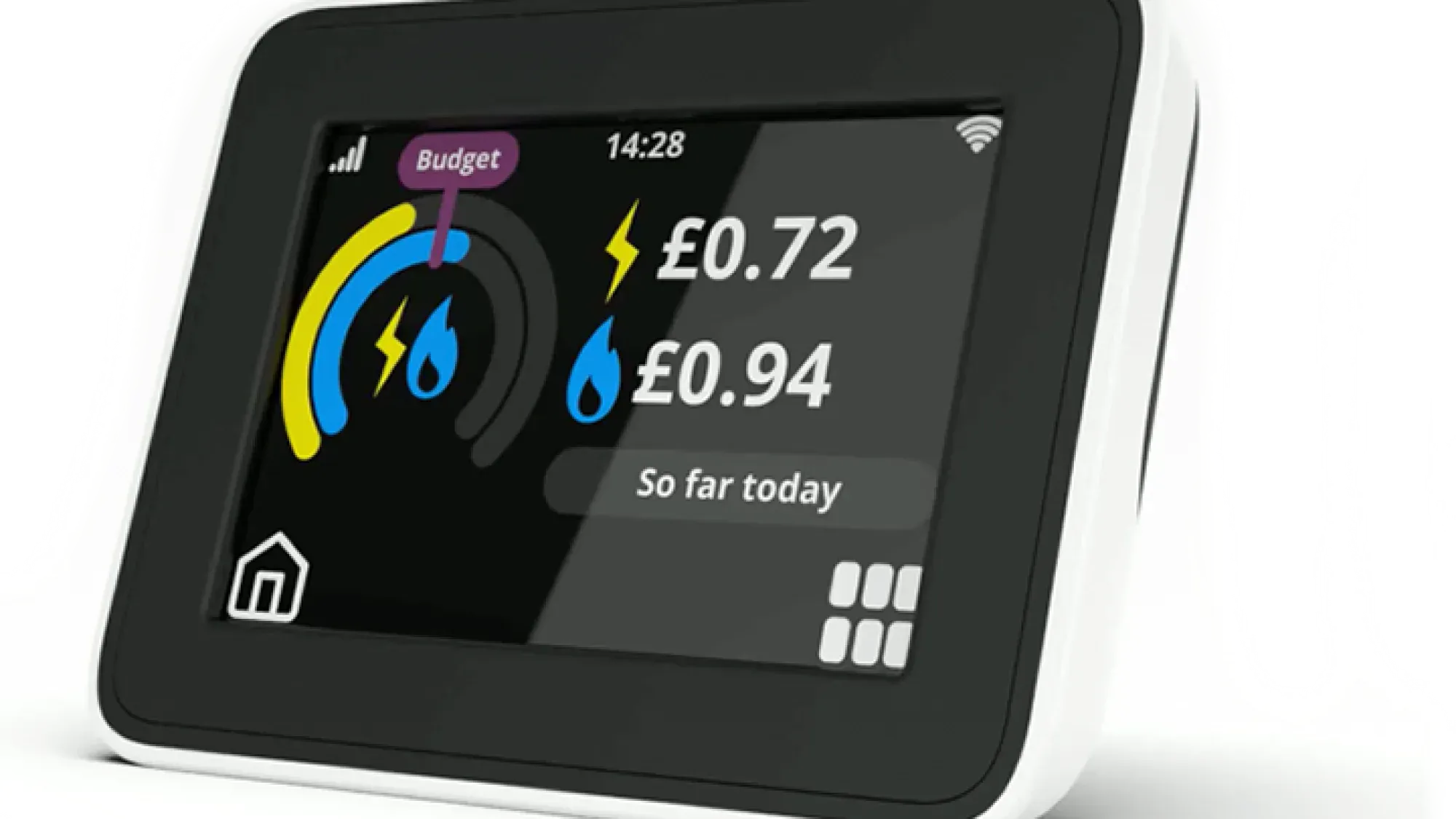
An In-Home Display (IHD) provides indicative, near real-time insights into your home's energy usage and costs, helping you manage your bills. These small, portable screens connect wirelessly to your smart meter, showing you how much electricity and gas you are using, and what it is costing you, as it happens. This immediate feedback helps demystify your energy consumption, empowering you to make informed decisions about your usage.
Understanding your energy usage is key to managing your bills. Fuse Energy offers clear pricing and in-app usage data to help you stay on top of your consumption. Click here to switch to Fuse Energy today.
Enter your address to get a quote and see how much you could save
What is an In-Home Display (IHD)?
An IHD is a small device that acts as a window into your home's energy consumption. It provides a clear, immediate overview of your electricity and gas usage, moving beyond estimated bills to give you indicative, near real-time data. This transparency helps you understand where your energy goes, empowering you to make informed decisions about your consumption.
The purpose of an IHD
The primary purpose of an IHD is to give you real-time feedback on your energy use. Instead of waiting for a monthly bill, you can see the impact of turning on appliances instantly. This immediate visibility helps demystify your energy consumption, making it easier to identify patterns and areas where you might be able to save.
Key information displayed
Your IHD typically shows real-time electricity and gas consumption in kilowatt-hours (kWh) and an estimated cost in pounds and pence. This allows you to see the financial impact of your energy use as it happens. Beyond live data, many IHDs also display historical consumption data, allowing you to compare your usage over different periods, such as daily, weekly, or monthly. Some advanced models may also show your current tariff information and offer the ability to set budgets or alerts.
What is the average UK home's electricity usage?
The average UK home uses around 2,500 kWh of electricity per year. This figure, provided by Ofgem, serves as a useful benchmark for households to compare their personal consumption against.
How your IHD works with a smart meter
An IHD is not a standalone device; it works in conjunction with your smart meter. Smart meters are being rolled out across Great Britain to offer every home better insight into their energy use. Your IHD connects wirelessly to your smart meter, receiving data on your energy consumption.
Wireless connection and data flow
Your IHD communicates with your smart meter using a secure wireless connection. The communications hub, which is part of your smart meter, acts as the network gateway, collecting data from both the electricity and gas meters (if you have both). This combined data is then sent to your IHD, allowing it to display comprehensive information on both your electricity and gas consumption. For full data display, both meters need to be functioning correctly.
Understanding SMETS1 and SMETS2 meters
Smart meters come in two main types: SMETS1 and SMETS2. SMETS stands for "Smart Metering Equipment Technical Specifications."
- SMETS1 meters were the first generation of smart meters rolled out. While they offered smart functionality, some older SMETS1 meters could lose their smart features if you switched energy suppliers.
- SMETS2 meters are the newer generation, designed to maintain smart functionality even when you switch suppliers. This ensures a more consistent experience and greater flexibility for consumers.
IHDs may be provided free of charge by energy suppliers when a smart meter is installed, though availability and delivery are not guaranteed. For more details on the benefits, you can read about smart meter benefits.
Making the most of your IHD data
Your IHD is more than just a display; it's a tool for active energy management. By understanding and interacting with the data it provides, you can gain greater control over your energy consumption and costs.
Real-time usage insights
The real-time display is one of the most powerful features of an IHD. It allows you to see the immediate effect of turning appliances on or off. For example, you can observe a spike in electricity usage when you boil a kettle or turn on an electric shower. This direct feedback can help you become more aware of which appliances consume the most energy in your home.
Tracking historical consumption
Beyond real-time data, your IHD typically stores historical consumption information. This allows you to review your energy use over days, weeks, or months. By tracking these trends, you can identify patterns, such as higher usage during certain times of the day or week, or seasonal variations. This historical perspective is crucial for understanding your overall energy habits.
Identifying energy-hungry appliances
One of the most effective ways to use your IHD is to identify which appliances are consuming the most energy. By observing the real-time display as you switch various devices on and off, you can pinpoint the biggest energy users. This insight can then inform decisions about appliance usage, replacement, or even unplugging items when not in use.
Using your IHD to manage energy and costs
Translating IHD insights into actionable changes is key to managing your energy and costs effectively.
Setting budgets and alerts
Some advanced IHD models may allow you to set daily, weekly, or monthly energy budgets. If your consumption approaches or exceeds these limits, the IHD can provide visual or audible alerts. This feature acts as a helpful reminder to adjust your habits and stay within your desired spending limits.
Shifting energy use to off-peak times
If you are on a time-of-use tariff (which requires a smart meter), some IHD models might display different unit rates for peak and off-peak periods. By understanding these rates, you can strategically shift energy-intensive activities, such as running your washing machine or charging an electric vehicle, to cheaper off-peak hours.
Complementing your IHD with the Fuse app
While your IHD provides real-time data, the Fuse app can complement this with richer historical insights and personalised advice. The app integrates with your smart meter data, offering advanced features for energy management that go beyond the IHD's basic display. This digital-first experience gives you more control over your energy by providing detailed breakdowns, helping you identify trends, and offering tailored suggestions for optimising your consumption. You can also learn more about understanding your energy bill to make the most of your data.
Common IHD issues and troubleshooting
Like any electronic device, your IHD might occasionally encounter issues. Knowing how to troubleshoot common problems can help you maintain its functionality and continue monitoring your energy use.
Blank screen or no data
If your IHD has a blank screen or isn't displaying any data, first check its power source. Ensure it's plugged in correctly or that its batteries (if applicable) are charged. If it's battery-powered, try replacing them. Sometimes, simply restarting the device by unplugging it and plugging it back in can resolve the issue. If the problem persists, it could indicate a connectivity issue with your smart meter.
IHD not connecting to your smart meter
A common issue is the IHD losing connection to the smart meter. This can happen if the IHD is moved too far from the meter or if there's interference. Try moving the IHD closer to your smart meter's communications hub. Ensure there are no large metal objects or thick walls directly between the IHD and the meter that might block the signal. If your gas meter data isn't showing, ensure both your electricity and gas meters are working, as both the gas meter and electricity meter connect to the shared communications hub.
Inaccurate readings or discrepancies
If you suspect your IHD is showing inaccurate readings or there are discrepancies with your energy bills, first compare the readings on your IHD with the readings directly on your smart meter. If they don't match, or if the IHD readings seem unusually high or low, it's worth contacting your energy supplier. They can investigate whether there's a fault with the IHD or the smart meter itself.
Getting and maintaining your In-Home display
Understanding how to obtain and maintain your IHD ensures you can continuously benefit from its energy-monitoring capabilities.
How to obtain an IHD
IHDs may be provided free of charge by your energy supplier when a smart meter is installed. If you already have a smart meter but don't have an IHD, or if yours is lost or broken, you should contact your energy supplier directly. You should contact your energy supplier, as they are typically the point of contact for IHD provision and support. You cannot choose a specific model or brand of IHD; they are supplied by your energy provider.
What to do if your IHD is lost or broken
If your IHD is lost, stolen, or broken, your first step should be to contact your energy supplier. They can advise you on how to get a replacement. In some cases, a replacement IHD may be provided, especially if the original was faulty, but availability is not guaranteed. However, if it was lost or damaged due to misuse, there might be a charge for a new one. Even without a functioning IHD, your smart meter will continue to send readings to your supplier, ensuring your bills remain accurate.
An In-Home Display is a powerful tool for understanding and managing your home's energy. Fuse Energy is committed to making energy management clear and easy, offering transparent pricing, real-time usage data through our app, and 24/7 human customer support. Switching to Fuse is quick and simple, helping you take control of your energy consumption and costs. Click here to switch to Fuse Energy today and discover a smarter way to power your home. You can also learn more about our mission to provide abundant, clean energy by clicking here.
Disclaimer
For the avoidance of doubt, this article is provided for informational purposes only and is not intended to constitute legal or financial advice. The author and/or Fuse Energy shall not be responsible for any losses arising out of any reliance on the information contained herein.